herdr and ttt: The Terminal Setup That Changed How I Work With AI Agents
herdr keeps all my coding agents in one terminal and tells me which one is waiting for me. ttt adds a VS Code-like editor right next to them. What both tools do, why they fit together, and the exact Mac setup.


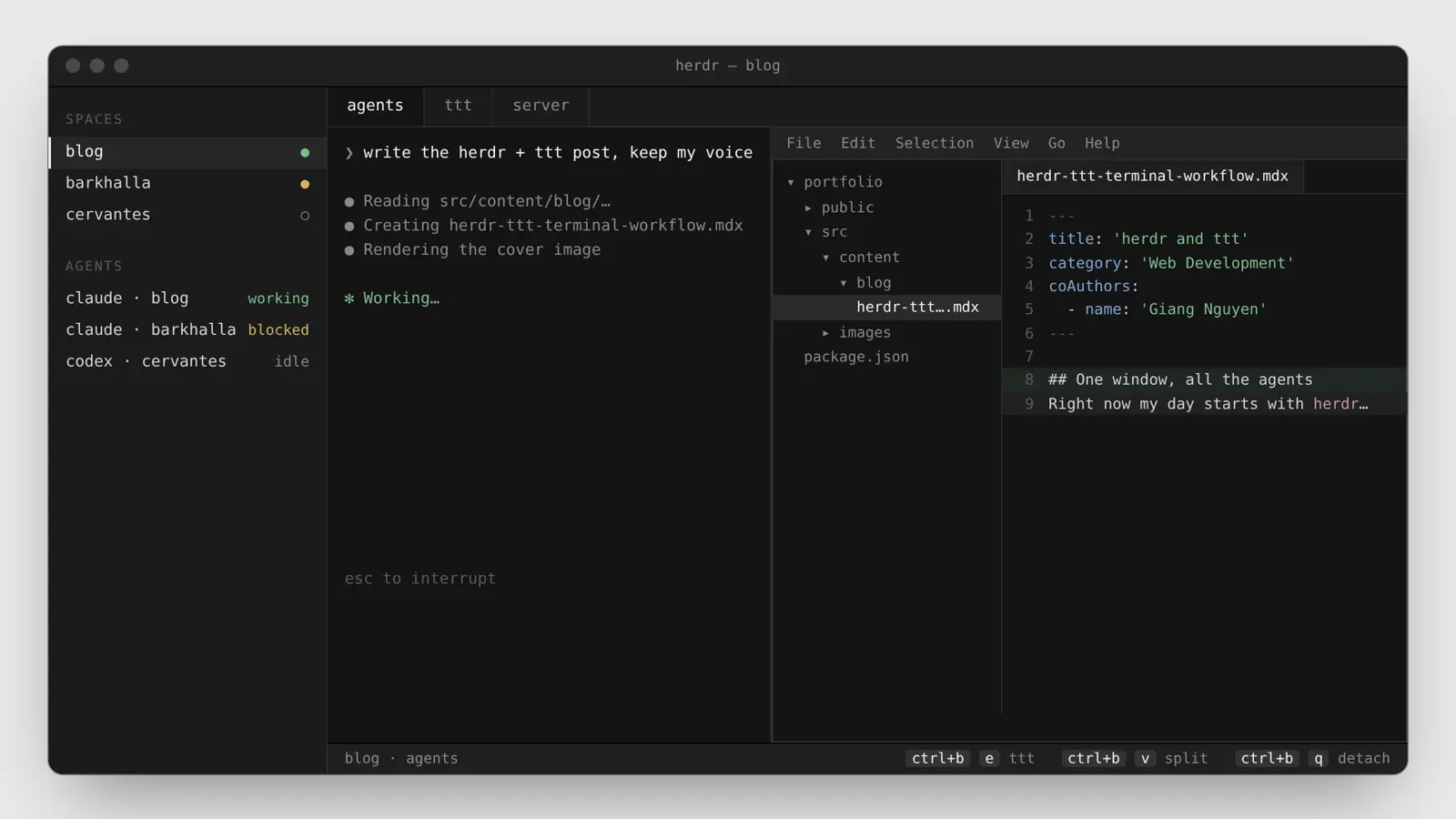
Right now most of my work happens in one terminal window. Coding agents run in panes, and when one of them finishes, I open an editor right next to it to check what it did. Two tools make that possible: herdr and ttt.
I wrote this post together with Giang Nguyen, and a big thanks goes to him: Giang is the one who showed me both tools.
The Problem Is Not Starting Agents
Starting a coding agent is easy. Running three of them in three projects is where it gets messy, and the hard part is not the agents themselves. It is knowing which one is waiting for you.
A normal terminal tab can’t tell you that an agent stopped ten minutes ago to ask a question. tmux keeps your sessions alive, but it treats every process the same: for tmux an agent is just text scrolling by. So you end up clicking through tabs to find the one that is stuck.
herdr: One Window for All Your Agents
herdr calls itself “the runtime your coding agents live on”. It is a terminal workspace manager, built by ogulcancelik, written in Rust and released under the Apache 2.0 license. It ships as one binary and runs inside the terminal you already use, so your fonts, theme and shell config stay the same.
The structure is simple:
- Workspaces, usually one per repo or task.
- Tabs inside each workspace, for example one for agents and one for a dev server.
- Panes, which are real terminals you split right or down.
What makes it different from tmux is that herdr recognizes the agents running in those panes: Claude Code, Codex, Cursor, OpenCode and others. Every pane is marked as working, blocked or idle, and the sidebar rolls those states up per workspace. Blocked means the agent is waiting for your input, so you see at a glance where you are needed. herdr can also play a sound or send a system notification when an agent in a background pane changes state.
A few other things that make it pleasant:
- Detach without stopping work. Closing the window or pressing
ctrl+b qdetaches, and the panes keep running in a background server.herdrreattaches. - Keyboard and mouse. You get tmux-style prefix keys (
ctrl+bby default,ctrl+b vto split right,ctrl+b cfor a new tab), and you can also click to focus, drag borders and right-click for menus. - Agents can drive it too. Through its CLI and socket API, agents can open panes, prompt each other and wait until another agent is really blocked.
- Plugins. This is where ttt comes in.
herdr is still before version 1.0 (version 0.9.5 when we wrote this). It restores your saved layout after a restart and can resume sessions of supported agents, but the original processes do not survive a reboot.
ttt: A VS Code-Like Editor That Lives in the Terminal
ttt, short for Terminal Text Tool, is an IDE that runs in your terminal. It is written in Go by Eugene Yakhnenko, released under the MIT license, and ships as a single binary with zero config.
The idea behind it is that you shouldn’t have to pick between a familiar editor and staying in the terminal. Vim and Neovim already live there, but as its author puts it, “modal editing is a wall”. ttt looks and behaves like VS Code instead:
- Menus, dialogs, mouse support and right-click context menus.
- A file explorer, tabs and
Ctrl+Pfor the command palette. - Normal shortcuts like
Ctrl+C,Ctrl+VandCtrl+Z, with no modes to learn. - LSP for more than 23 languages: completions, diagnostics, go to definition and rename.
- Git built in: stage, commit, inline diffs, blame and GitHub PR review.
- Search across files powered by ripgrep, an integrated terminal and Lua plugins.
The author built it with terminal agents in mind. The agent works in the terminal, so the editor you use to review its changes should live there too. His summary is the best one I have read: “Your agent works. You review. Same context, same window.”
Why the Combination Works
On their own, herdr organizes the agents and ttt is a good terminal editor. Together they close the loop.
ttt ships a herdr plugin that opens the editor as a pane inside your herdr workspace, already pointed at the active worktree or workspace folder. Right-clicks go to ttt, so its context menus work, while right-clicking the pane frame still opens herdr’s menu.
So the loop is: an agent finishes, the sidebar shows it, you press ctrl+b e, and the project is open in ttt next to the agent. You read the diff, fix a line by hand if needed, and switch back to the agent tab. You never leave the window and never wait for a second app to start.
How to Set Up herdr and ttt on a Mac
These are the steps I needed on my Mac.
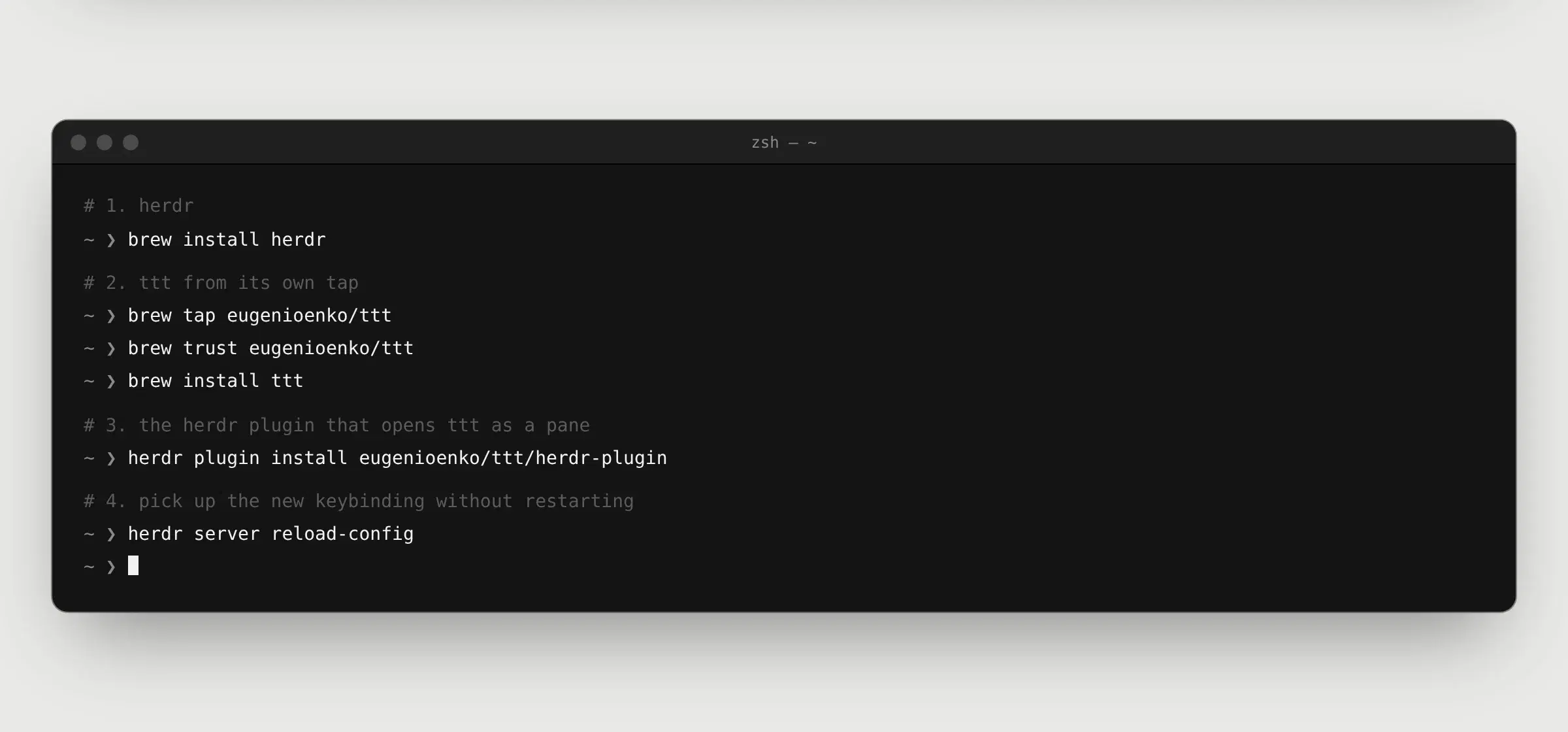
1. Install herdr. It is on Homebrew:
brew install herdr
If you don’t use Homebrew, there is also an install script: curl -fsSL https://herdr.dev/install.sh | sh.
2. Install ttt from its tap. On my Mac I also had to trust the tap before installing:
brew tap eugenioenko/ttt
brew trust eugenioenko/ttt
brew install ttt
3. Install the herdr plugin for ttt:
herdr plugin install eugenioenko/ttt/herdr-plugin
The plugin installs the ttt binary on its own if it can’t find it on your PATH. Installing it with Homebrew first keeps updates in one place.
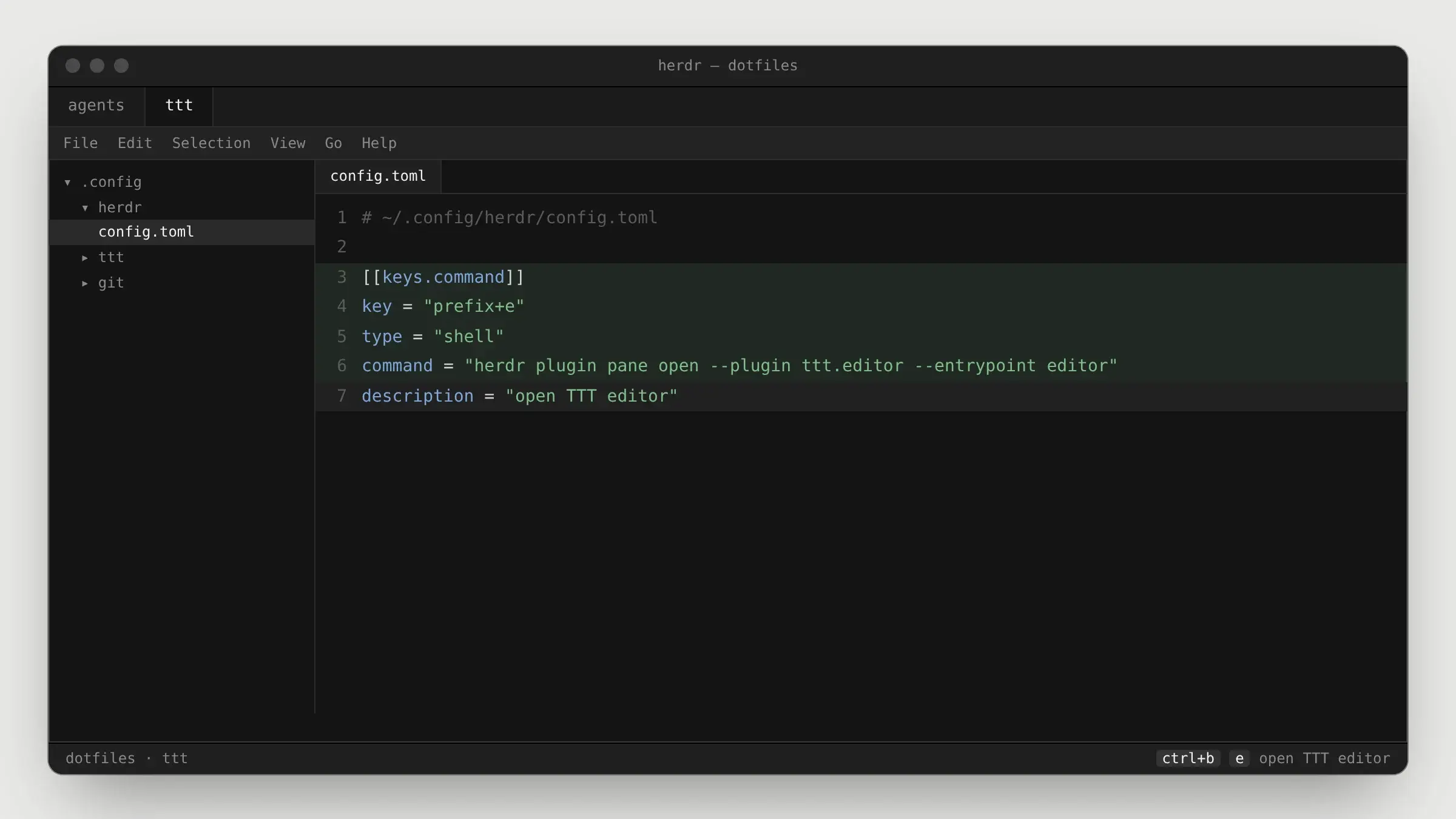
4. Add a keybinding. Open ~/.config/herdr/config.toml (create it if it doesn’t exist) and add:
[[keys.command]]
key = "prefix+e"
type = "shell"
command = "herdr plugin pane open --plugin ttt.editor --entrypoint editor"
description = "open TTT editor"
5. Reload the config. Restart herdr, or apply the change to the running server:
herdr server reload-config
Now press ctrl+b, let go, and press e. ttt opens in a new tab of the current workspace. ctrl+b ? shows all active bindings if you forget one.
What Changed for Me
Before, my agents lived in separate terminal tabs and I reviewed their work in a separate editor window. Now each project is a herdr workspace, the sidebar tells me which agent needs me, and the code review happens one keystroke away from the agent that wrote it.
That sounds small, but it removes the step where I lose the most time: switching windows, finding the right project again and remembering what the agent was doing. Everything for one project stays in one place, and when I close the window, it is all still there the next time I run herdr.
FAQ about herdr and ttt
herdr is a terminal workspace manager for AI coding agents. Like tmux, it keeps your terminals running in a background server, but it also recognizes agents such as Claude Code or Codex in its panes and marks each one as working, blocked or idle. It is one Rust binary, open source under Apache 2.0.
References
- herdr on GitHub and the herdr docs
- herdr agent guide: concepts, default keys and config location
- ttt on GitHub and the ttt herdr plugin
- Eugene Yakhnenko, I built a terminal IDE that feels like VS Code. Here’s why, DEV Community
- Better Stack, Herdr: terminal multiplexer with built-in AI agent state awareness
Share article